
Even as modern industrial networks move toward high-speed, unified Ethernet, the reality on the ground is quite different. Millions of legacy serial devices — from PLCs and CNC machines to protection relays — are still the workhorses of the factory floor. They rely on proven RS-232, RS-422, or RS-485 interfaces, which are incredibly reliable but were never designed for modern IP networks or cybersecurity.
If you are not familiar with Serial Standards, how they work, and why we still use them in the 21st century, we recommend reading our dedicated article.
To bridge this gap and bring these legacy devices online, engineers rely on specialized network hardware. Generally speaking, there are two distinct types of devices used to accomplish this task: Serial Device Servers and Terminal Servers.
What is a Secure Terminal Server and Why Do We Need It?
While both types of devices serve the same fundamental purpose — encapsulating serial data into IP packets (TCP or UDP) so it can travel over standard Ethernet — they are deployed in very different ways.
A Serial Device Server is a straightforward edge bridge. It is usually a compact device installed right next to a machine, allowing field components like sensors or motors to communicate with the local factory network.
A Terminal Server (often called a console server), on the other hand, is built for scale and centralized control. It is designed to aggregate massive amounts of serial data and provide remote, out-of-band (OOB) access to the console ports of critical IT/OT infrastructure, such as core switches, routers, and power distribution units in server rooms or substations.
If you are not familiar with Serial Device Servers, we suggest reading our dedicated article.
When does a Terminal Server need to be "Secure"?
Standard servers are perfectly fine for isolated, closed networks. However, when dealing with critical infrastructure — such as power utilities, gas operators, or telecommunications — passing unencrypted serial data over public or wide-area networks is a massive risk. A Secure Terminal Server solves this by integrating heavy cryptographic layers directly at the network edge. It encrypts data streams using TLS v1.2/1.3 and SSHv2, authenticates users through strict role-based access control (RBAC), and maintains detailed incident auditing logs.
Understanding the Moxa G2 Portfolio: NPort 6000-G2 vs. IA5000-G2
To address these strict modern requirements, Moxa recently updated its secure portfolio. Before we dive into the Terminal Servers, it is important to clarify the difference between the two new core product lines on the market. While both the new NPort 6000-G2 and the recently launched NPort IA5000-G2 share the exact same stringent IEC 62443-4-2 Security Level 2 (SL2) firmware, they serve entirely different purposes:
- NPort IA5000-G2 (Secure Serial Device Servers) — Engineered strictly for field-level automation. With rugged DIN-rail housings, dual power inputs, and a maximum 4-port density, it is designed to sit inside control cabinets to safely connect machine-level hardware directly to the factory floor network.
- NPort 6000-G2: NPort 6100-G2/6200-G2, NPort 6400-G2, NPort 6600-G2 (Secure Terminal Servers) — Engineered for centralized IT/OT infrastructure. Scaling up to 32 ports in a 1U rackmount chassis, its job is to sit in data centers or substations, aggregating clusters of serial data and providing secure remote console management.
Looking Back: Generation 1 of the NPort 6000 Series
Moxa’s first secure terminal server — the original NPort 6000 Series (Generation 1) — was an industry standard for years. It successfully pioneered encrypted serial-to-Ethernet connections using TLS, SSH, and AES algorithms.
However, as industrial networks grew more complex and cyber threats became more sophisticated, OT cybersecurity standards evolved rapidly. Looking at Gen 1 through the lens of today’s strict requirements, several critical architectural gaps became evident:
- No Hardware Root of Trust: Generation 1 lacked advanced hardware security features like a True Random Number Generator (TRNG) and Secure Boot, which are now foundational for guaranteeing device integrity and defending against firmware-level attacks.
- Lacking Modern Certification: While secure for its time, the original series was not formally evaluated or certified against the modern IEC 62443-4-2 framework, which is increasingly mandated by global security directives like NIS2.
- Manual Hardware Tuning: To configure RS-485 networks, engineers were forced to physically open the device chassis and manipulate internal DIP switches to adjust pull high/low resistors and terminators, significantly increasing deployment time in the field.
Next-Generation Upgrades in the G2 Platform
The NPort 6000-G2 Series resolves its predecessor’s limitations with a completely overhauled internal architecture developed under the IEC 62443-4-1 secure lifecycle process.
- IEC-Certified Security Architecture: The G2 series is fully certified to IEC 62443-4-2 SL2. It introduces Hardware-Level Secure Boot, which cryptographically verifies the digital signature of the firmware during the boot process. If unauthorised code is detected, the device refuses to boot, neutralising the threat immediately.
- Software-Configurable RS-485: The requirement to open the chassis has been eliminated. All pull high/low resistors and the 120-ohm terminator are now fully adjustable via the Web GUI, streamlining field deployments.
- Automated Diagnostics: A new one-click log collection tool consolidates system logs, network traffic records, and diagnostic data into a single downloadable archive. Paired with a built-in application analyzer, it instantly generates diagnostic reports to pinpoint communication failures.
- Optimised Form Factors: The physical design now includes side-mount installation capabilities and two-sided LED indicators, ensuring visibility and fit within highly congested automation cabinets.
Portfolio Overview: Discovering MOXA NPort 6000-G2 Series
The G2 series portfolio scales from single-node deployments to high-density server racks. While all models share the same secure firmware, their physical interfaces dictate their target applications.
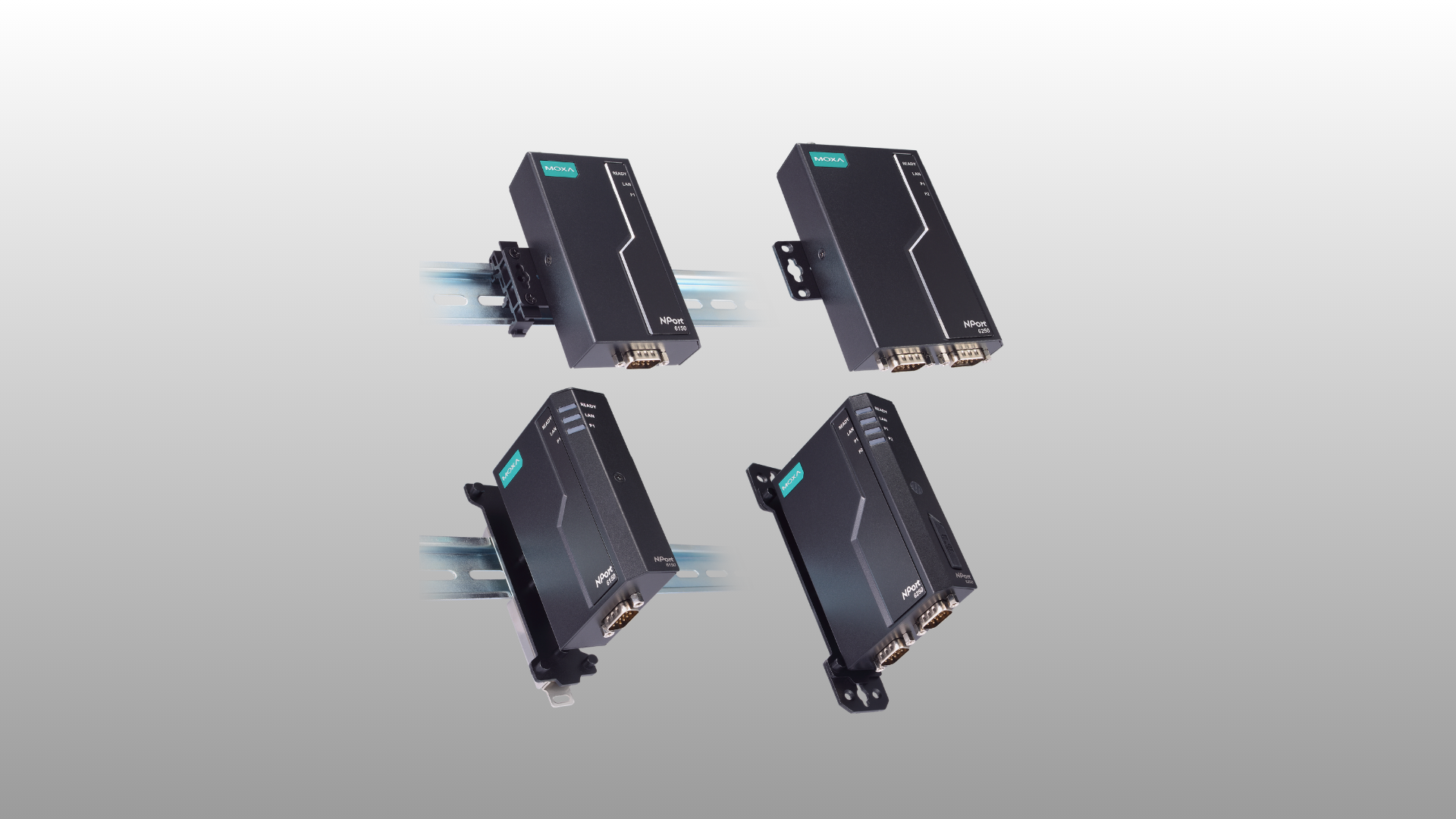
NPort 6100-G2 Series
Designed for edge endpoints, this compact 1-port server supports RS-232, RS-422, and RS-485 standards over a single Fast Ethernet uplink. Its side-mount layout is optimized for integrating isolated legacy machines into the network with minimal spatial footprint.
NPort 6200-G2 Series
This 2-port model introduces local data buffering. It features a microSD slot supporting up to 2 TB of storage. In the event of a network disconnection, incoming serial data is automatically buffered locally and transmitted once the IP connection is restored, ensuring zero data loss.
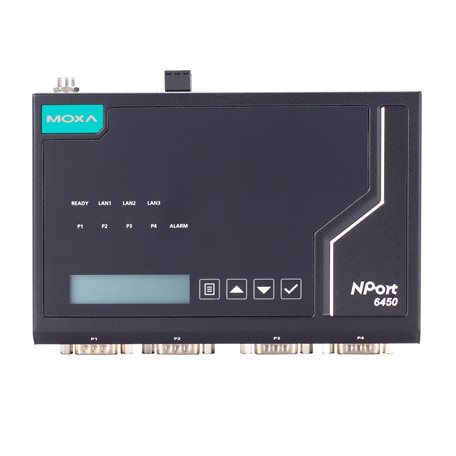
NPort 6400-G2 Series
A robust solution for medium-density nodes, featuring 4 serial ports and up to 3 Fast Ethernet interfaces. This multi-port network design is a significant advantage: it allows engineers to daisy-chain (cascade) multiple devices without requiring an external Ethernet switch. Its compact footprint makes it the optimal choice for roadside traffic control cabinets and building automation systems.
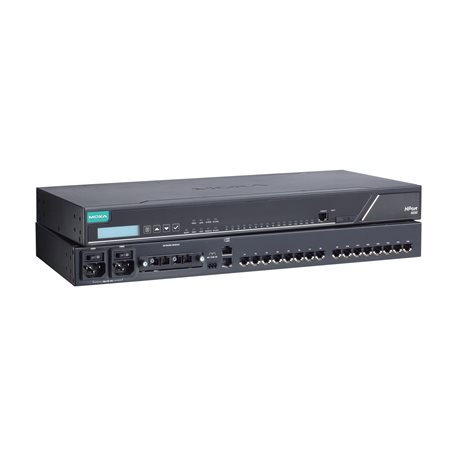
NPort 6600-G2 Series
The definitive choice for centralized infrastructure, available in 8, 16, or 32-port densities housed in a standard 1U 19-inch rackmount chassis. It features up to 2 Gigabit Ethernet ports (expandable to 4 via plug-in modules). Because aggregating 32 devices creates a high-risk bottleneck, these units support dual power supplies for hardware redundancy and optional 2 kV galvanic isolation to prevent electrical surges from destroying the server.
NPort 6000-G2: Hardware Selection Guide
To assist in specifying the correct hardware for your network topology, refer to the following selection matrix and modifier breakdown:
NPort 6100-G2 / 6200-G2 vs 6400-G2 vs 6600-G2
| Selection Criteria | NPort 6100 / 6200-G2 | NPort 6400-G2 | NPort 6600-G2 |
|---|---|---|---|
| Port Density | 1 or 2 serial ports | Exactly 4 serial ports | 8,16, or 32 high-density ports |
| Network Uplink | 1 x 10/100 Mbps Fast Ethernet | 1 to 3 x 10/100 Mbps Fast Ethernet | Up to 4 x Gigabit Ethernet (Modular) |
| Form Factor | Compact side-mount / desktop | Desktop, wall, or DIN-rail layout | Standard 19-inch rackmount chassis |
| Serial Standards | Universal (RS-232/422/485) | Universal (RS-232/422/485) | RS-232 only (6610) or Universal (6650) |
Hardware Modifiers to Note:
–T Models: Built for unconditioned environments, extending the operating temperature from standard (-10 to 60°C) to wide (-40 to 75°C).
“I” Suffix (e.g., 6650I): Includes hardware-level 2 kV serial port isolation to protect against severe ground loops and voltage spikes.
-2AC / -48V Suffix: Identifies power infrastructure requirements. “-2AC” dictates dual-redundant AC power mains, while “-48V” operates on telecom-grade DC power.
Universal Platform Features (Shared Across All G2 Models):
Regardless of the port count or physical chassis selected, every device in the Gen 2 lineup guarantees the same operational baseline:
- IEC 62443-4-2 SL2 Certified: Every unit operates on the same hardened firmware architecture, ensuring full compliance with global OT cybersecurity mandates.
- Hardware-Level Secure Boot: Cryptographically verifies firmware integrity on startup, preventing the execution of unauthorized or tampered code.
- Advanced Cryptography: Ensures end-to-end encryption via TLS 1.2/1.3 and SSHv2, supported by AES-256, RSA-4096, and ECC-521 cryptographic keys.
- Software-Configurable RS-485: Eliminates the need to open the chassis; all pull high/low and termination settings are strictly handled via the Web GUI.
- Diagnostic Toolkit: Includes the automated one-click log collection tool and built-in application analyzer for rapid deployment and troubleshooting.
Migration Plan: Transitioning to the G2 Architecture
Moxa has engineered a direct configuration pathway to ensure that legacy Gen 1 parameters can be migrated to Gen 2 devices with minimal operational downtime.
- Software Update: Ensure your administration tools are updated to Device Search Utility (DSU) v3.x and Windows Driver Manager v3.6/v4.3.
- Configuration Export: Access the legacy NPort 6000 web console, navigate to “System Configuration > Backup/Restore”, and assign a pre-shared key. This key acts as the cryptographic password required for the export file.
- Secure Import: Log into the NPort 6000-G2 web console. The system will automatically trigger a first-time login process, prompting the administrator to input the pre-shared key and import the legacy configuration.
- Batch Provisioning: For large-scale facility upgrades, utilize DSU v3.x to execute batch configuration imports and firmware updates simultaneously across multiple units.
Note: Certain obsolete legacy functions (such as Ethernet Modem mode) have been deprecated in the G2 firmware and will not map during the import process.
Conclusion
The NPort 6000-G2 Series bridges the gap between highly reliable, decades-old serial interfaces and the uncompromising cybersecurity standards required by modern IP networks. While the NPort IA5000-G2 handles edge bridging on the factory floor, the 6000-G2 secures the core of the network infrastructure. By combining hardware-level boot integrity, IEC 62443-4-2 SL2 certification, and drastically simplified remote management tools, this platform ensures legacy serial equipment remains a secure, functional component of modern operational technology.
For more information about Moxa NPort 6000-G2 choose the model:
Get in touch!
The APulsar team hopes that this article has been insightful for you. Anytime you need advice, assistance, or technical support — just contact us.
And if you would like to see more useful guides like this one, don’t forget to subscribe to our newsletter below!

This is the heading
Lorem ipsum dolor sit amet, consectetur adipiscing elit. Ut elit tellus, luctus nec ullamcorper mattis, pulvinar dapibus leo.